# Theme Installation
Before installing the theme, please make sure you unpacked the archive and extracted the theme files. If you try to install the wrong files, you will get the missing style.css error. This is the most common error that means you are trying to install an incorrect package.
There are two ways you can use to install the **Theme**.
### Install from WordPress
1. Log in to your WordPress site. (`http://your-site.com/wp-admin`)
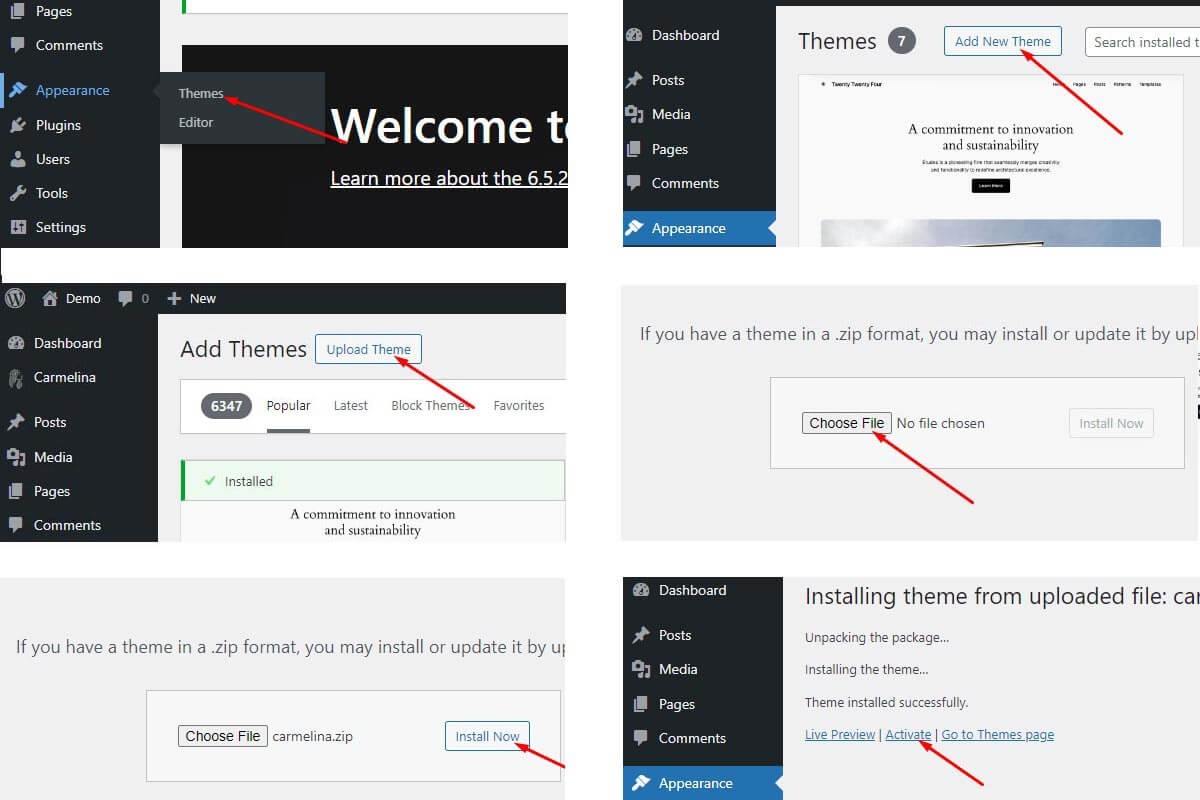
2. Go to **Appearance > Themes** and click on **Add New** **>** **Upload Theme**.
3. Select the **theme\_name.zip** file and click **Install Now** button.
4. The theme will be uploaded and installed
5. When the installation complete, click **Activate**. You will be redirected to steps in the popup wizard setup
### Install Using FTP
1. Log into your hosting via a FTP software (eg. FileZilla)
2. Upload theme folder (Unzip theme\_name.zip) to *`wp-content/themes`*
3. Login to your admin in WordPress (`http://your-site.com/wp-admin`)
4. Go to `Appearance - Themes`
5. Activate your theme
*Notice: After activating the theme, you will be prompted to install and activate the required plugins. Those are essential plugins and theme can't run without it.*