# System Requirements
Most common issues like Demo Import failure, page builder loading delay or false or page save errors are generally related to excessively low PHP configuration limit settings. Some hosts will try to keep PHP limits low to conserve resources. You can either increase these limits on your own, or contact your web host and ask to have the limits increased.
### **PHP Configuration Limits**
We recommends following server settings for Our WordPress Theme:
* PHP Version: 7.4.0 or greater
* PHP time limit (max\_execution\_time): 600s or greater
* Server Memory (memory\_limit): 512M or greater
* Post Max Size (post\_max\_size): 64M
* PHP Max Input (max\_input\_vars): 3000 or greater
* Max Upload (upload\_max\_filesize): 64M
### **Other Configuration Requirements**
* GD Library: Necessary to be installed for Captcha and Image cropping
* cURL: Supported by the server.
* OpenSSL: Supported by the server.
* allow\_url\_fopen: On - Supported by the server.
* mod\_rewrite: The Apache module needs to be activated for pretty permalinks.
### Verify your PHP limits
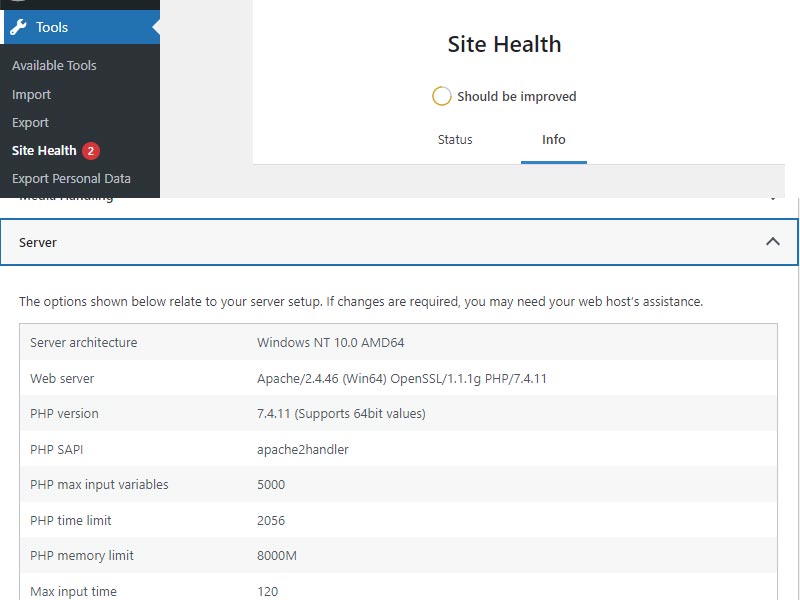
You can check them by going to Tools -> Site Health -> Info -> Server.
You can refer to the document for Wordpress:
You can refer to the document for Elementor:
Setting these values will ensure you will not get error messages during the installation. To safeguard your website, please use secure passwords and the latest version of WordPress and plug-ins.
---
# Agent Instructions: Querying This Documentation
If you need additional information that is not directly available in this page, you can query the documentation dynamically by asking a question.
Perform an HTTP GET request on the current page URL with the `ask` query parameter:
```
GET https://7iquid.gitbook.io/basilico-wordpress-theme/getting-started/system-requirements.md?ask=
```
The question should be specific, self-contained, and written in natural language.
The response will contain a direct answer to the question and relevant excerpts and sources from the documentation.
Use this mechanism when the answer is not explicitly present in the current page, you need clarification or additional context, or you want to retrieve related documentation sections.